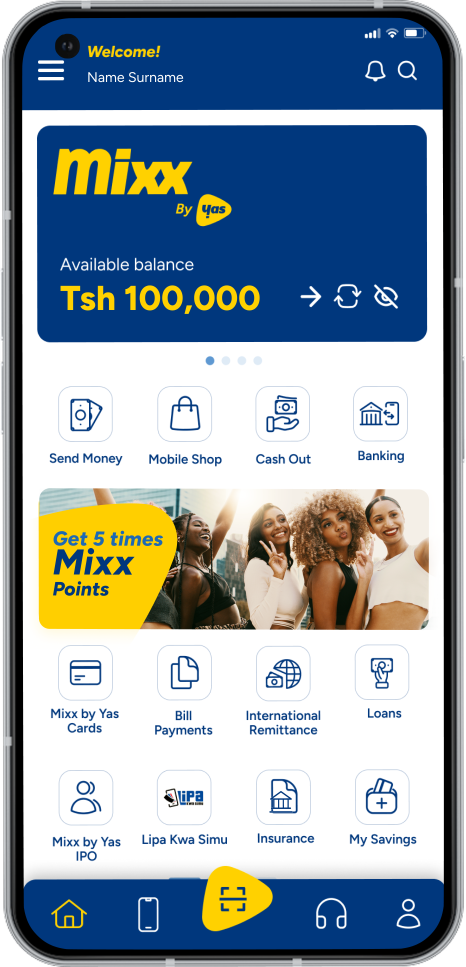
Digital social fundraising platform designed for Mixx by Yas customers

master your
money effortlessly

Digital social fundraising platform designed for Mixx by Yas customers

Mchango – A digital social fundraising platform designed for Mixx by Yas customers  

Mchango is a digital social fundraising platform designed for Mixx by Yas customers. It enables users to easily create and manage fundraising accounts for community events such as weddings, funerals, anniversaries, religious ceremonies, medical support, educational needs, and other social causes. Customers can receive contributions from any mobile network and all banks in Tanzania.

Key Mchango Features are:  

  • Contributions and Pledges from all mobile networks and banks 
  • Sending invitation cards 
  • Reminder SMS 
  • Make Payment within Mchango Accounts, such as Send Money, Lipa Kwa Simu, Transfer to Bank, and Cashout. 
  • Seamless Reports 

How to use Mchango via Mixx Super App

How to Create Mchango Account

  • Open your Mixx Super App 
  • Select Mchango 
  • Select My Mchango Accounts 
  • Select Create New Account 
  • Fill in the Mchango details 
  • Accept Terms & Conditions 

How to Make Contribution / Pledge

  • Open your Mixx Super App 
  • Select Mchango  
  • Select Contributions & Pledges 
  • Select Create New Pledges 
  • Enter the Amount 
  • Press Contribute 
  • Enter Mixx PIN 

How to make
payments

  • Open your Mixx Super App 
  • Select Mchango 
  • Select My Mchango Accounts 
  • Select the specific Mchango account you created and set your PIN 
  • Select Manage on that account 
  • Choose your preferred payment option, such as Send Money, Lipa Kwa Simu, Transfer to Bank, or Cashout

How to send a reminder SMS

  • Open your Mixx Super App 
  • Select My Mchango Accounts 
  • Select Manage on that account 
  • Select Account Management 
  • Then Select Reminder SMS
  • You can draft your SMS and share to the list of preferred numbers  

How to Send Invitation Cards

  • Open your Mixx Super App
  • Select My Mchango Accounts 
  • Select Manage on the specific account 
  • Select Account Management 
  • Choose Invitation Cards
  • Share the invitations with your preferred contacts 

How to extract
reports

  • Open your Mixx Super App 
  • Select My Mchango Accounts 
  • Select Manage on that account 
  • Select Account Management 
  • Select Reports 
  • Then fill in the requirements 
Mixx By Yas logo

Get the Mixx Super App and enjoy the simplest, fastest, and most convenient mobile money transactions

Frequently Asked Questions

Find solutions fast. Get the most out of your mobile money experience.
What is Mchango?
Mchango is a service under Mixx by Yas that enables you to collect contributions digitally from any mobile network and all banks in Tanzania for occasions such as weddings, education, religious ceremonies, birthdays, anniversaries, send-offs, kitchen parties, funerals, and other social events seamlessly through your mobile phone from anywhere.
All Mixx by Yas customers can open and use Mchango to collect all their contributions to facilitate a given event. Customers can also receive contributions from other mobile networks and any bank in Tanzania.
You can open Mchango account and collect funds and contributions from all mobile networks through your Mchango QR Code. To open a new Mchango account, simply open Mixx Super App, then select Mchango > My Mchango Accounts > Create New Account.

You can simply contribute to your Mchango wallet. 

For Mixx by Yas Customers 

  1. To contribute through Mixx Super App by selecting Mchango > Select Contributions & Pledges > Contribute/Pledge  
  2. Also, you can simply Dial *150*01# > Lipa Kwa Simu > To Mixx by Yas > Enter Mchango number  

For customers from other Mobile Networks and Banks 

  1. To contribute directly from other mobile networks/banks, simply go to the Menu > Lipa Namba > Select Mixx by Yas > Enter Mchango QR Code > Enter Amount   
Yes, you can contribute from any network to Mchango Account and from banks through Mchango QR Code provided.
You can easily get your Mchango QR Code from the Mchango Menu on Mixx Super App. Then select My Mchango Accounts, and you will be able to see all the Mchango QR codes.
One person can have up to five (5) Mchango Accounts with Mixx by Yas.
You can do many transactions or payments using the Mchango account, such as Send Money to all mobile networks, Bank transfer, Lipa Kwa Simu, and Cashout.
Yes, you can delete your Mchango account if you have no use for it anymore.
During account creation, a customer will have a choice to select how long he/she is expecting to keep the Contribution (Mchango) account open for the sake of mobilizing funds from fellow contributors, and upon expiry Mchango account owner will be reminded to utilize the funds collected. The validity is from 2 days to 365 days.

No, you can’t extend validity; a customer chooses the validity from the beginning to fit their needs at a moment.

Mchango gives you a simple, secure, and convenient way to collect, track, and manage community contributions digitally from anywhere.
Open your Mixx Super App > Select Mchango > Select My Mchango Accounts > Select the specific Mchango account you created and set your PIN > Select Manage on that account > Select Send Money > Select the number you want to send to and enter the amount > Enter PIN.
Customers will be able to contact Mixx for any complaints; this includes calling 100 or visiting the nearest Yas Store or channeling your query through our social media pages.

Terms & Conditions

view the terms and conditions for Mchango